Archive. This is the write-up of a CodePlex project from 2010, Requirements to Code Mapper for Team Foundation Server 2010/2012. It is preserved here because of what it is called and what it tried to do: the tool was named Helix, it used the terms design point and code implementation point, and its stated "future vision" was "a service to move function point location based on a merge."
Sixteen years later, Helix (2026) is that service: the six-stage re-anchoring engine that follows a span through edits, renames, and blocks cut into new files. Same problem, same name, same vocabulary. What changed is that agents now maintain the links instead of a developer dragging work items onto code in Visual Studio.
Screenshots below are of the original 2010 tool. So is the prose, spelling and all; it is preserved unedited.
Requirements to Code Mapper for Team Foundation Server 2010/2012
Original CodePlex Project: https://codeplexarchive.org/project/functionpoints
Internet Archive: https://web.archive.org/web/20171223222647/http://functionpoints.codeplex.com/ (December 2017 Wayback capture of the original project page)
Created: 2010
Download: functionpoints.zip (10.5 MB)
Project Overview
One of the most common complaints in the software world is tracability from Requirements to Code to Testing. Regardless of your methodology, the link between which requirement was fulfilled and the code that fufilled it is an arduous (if not impossible) task to complete. Consider the following ALM processes in action.
Tracability by Change
"But it is also tradition that times must and always do change, my friend."
-Prince Akeem, Coming To America
If you replace the word time with requirements, the statement would still be just as accurate.
Kent Beck tells us to "Embrace change", Change is inevitable. Business processes change, requirements change, everything changes for one reason or another. We keep lots of documentation on what changed but rarely ever able to tie it to the exact code that changed as a result. We are supposed to by changesets, but that sometimes becomes difficult to determine what was a result of the original requirement, and what was a result of the changed requirement.
Tools like Team Foundation Server have given us the ability to combine Work Items to changesets, but this often isn't granular enough. We can sift through changesets attempting to link a change requirement to a particular change in the code but often it takes more time or is indistinguisable.
The intention of Helix is to aid in mapping Change in Requirements to the change in code. It also serves the purpose of mapping an intended change to the actual change.
Waterfall
Waterfall is infamous for the level of documentation and somewhat linear/rigid process. Many would like to state that it simply doesn't work well for software projects, some insist that it's because most people do not know how to estimate or manage software projects. Waterfall typically contains 5 phases.
Requirements -> Design -> Code -> Test -> Deploy
Ignoring the fact waterfall assumes perfection, consider this in terms of time, change tracking, and test impact. Recently, there have been more tools around Test Impact, but it comes later in the lifecycle in the build phase. When a QA team is planning their test cases for new functionality, they are not always aware of what may be affected by some change across a shared library. Waiting for code completion tends to slow everything down and QA teams guessing at anything else impacted (considering they have no visiblity of the code path).
What we typically see is that at the Requirements / Design phases, information is fed to QA from the requirements and predicted design. Design can be translated to "This is what we plan to touch". Out of this, QA usually gets 1-2 documents, a requirments document stating the functionality desired, and a design document which is given to engineers to code up.
The Team Structure Problem
This is where things start to go wrong. Assume a medium sized team for the following example:
- 3 Business Analysis that produce requirements documentation
- 4 Designers / Senior Developers that analyze existing code and determine placement of new/modified code and possible impact
- 10 Engineers - Doing what they do.
- 20 QA Testers
Why so many QA? Regression testing. In my experiences the QA team will do a full regression (multiple times). As software features grow the amount of testing per release grows because each release has more features to re-test. Some methods like Risk Based Testing try to ease some of this, but that is only as good as the person that determines what components need to be touched.
Common Issues
As you move further down the pipeline many things happen:
- Requirements Conflict / Cross Impact (two features have conflicting requirements)
- Requirements Change
- Unforseen code impacts (This would never affect that other feature!)
- Humans being imperfect.
- Unforseen Edge Cases
Only as code is built do we start to see these impacts (Code is King) no matter how much we tried to predict them. We attempt to prevent by documenting everything we can, usually in word, and then scramble to keep documentation up to date. Add in the new complexity of trying to determine if any changes have impacts on other features and traceability becomes infeasible. There is no way to match the code that was modified, why it was modified, and business reason behind it easily using these techniques (note, I did not say methodology)
Agile (and all its forms)
Agile development isn't any different, the only thing is it tends to keep the documentation down so not as much effort (assumed) has to be done to maintain the tracebility. In reality, it's the same problem.
Team Foundation Server and Application Lifecycle Management (ALM)
Team Foundation Server has aided this significantly with Work Item Tracking and code association to work items, but that is only as effective as the developer checking in code and complying to rules. Nothing prevents the developer (without a really complex check-in policy) from checking in code associated with 2 work items but only applying it to one, the reverse is also true.
Secondly, many large organizations (or larger development teams) are frequently trying to find a way to measure efficiency of Planned vs. Actual estimates so when they go ask for money the next time, stakeholders have more comfort in getting what they paid for and developers/designers to not look like an amateur. I realize the comments could be made about quality requirements, but winning that argument is as likely as winning the "Does God Exist?" argument...
This has lead to techniques such as multi-stage estimation where you refine your estimate over the requirements / design process as you start getting more information. However, as logical as it seems on paper, it doesn't work as expected and still causes a bottleneck (for instance, QA/UAT groups can not do some test planning without knowing what is being designed.
A Simple Example:
- Requirement: User needs to be able to log into the system
- Design: Need to build Login.aspx page with user/pass controls
- QA: Needs design input before building test cases to consider what they will be testing.
Where does 'Helix' Fit in?
Helix (our name for the final product) looks to absolve that by providing a more visual view of requirements and provide tracability utilizing TFS as the store and introducing two new work item types, and some new controls for Visual Studio 2010+.
Design Point
Represents something we want to modify/add whatever. Relates to some feature/issue/bug whatever happens to be. Effectivly this is a an annotation in code. The exception is that it uses code discovery to determine what method, class, interface etc is affected. That is stored in a work item field so it becomes queryable. The advantage to this the ability to report on multiple scope items that may impact the exact same modules. From that we have an indicator that there should be some investigation to ensure that one doesn't impact the other, and if so, they are in the proper order (for instance, a shopping cart that adds shipping and then calculates tax. The order of operations impacts the outcome and eliminates having to waste cycles getting a fix out there that could have been identified very early. The design point is also versioned and maintains the version that it was created on. As files are checked in, the designer can review any changes and use document merging/tracking to move the location of the design point based on the new version of the code file.
Code Implementation Point
This was inspired by the Code Review Add-In and looks to address the problem of associating code with a paticular design point (M:N). This is where the true tracability comes in. The engineer when completing work has the ability to highlight code that was modified and drag and drop to the design point adornment. This creates the Implementation point work item that can now tell you exactly what code was modified to fufill what requirement.
In Action
I've created a sample project based off a simple MVC Template. The project type isn't all that important (WPF/MVC/ASP.NET, etc.) just the code files (so it can do code discovery).
We've introduced two new tool windows. The Function Point Explorer and the Function Point Selector. The first retreives the query tree from TFS and the first level of work items. For now, we are going to focus on Sprint Backlog items. (Work item type does not matter)
Step 1: Drag Work Item
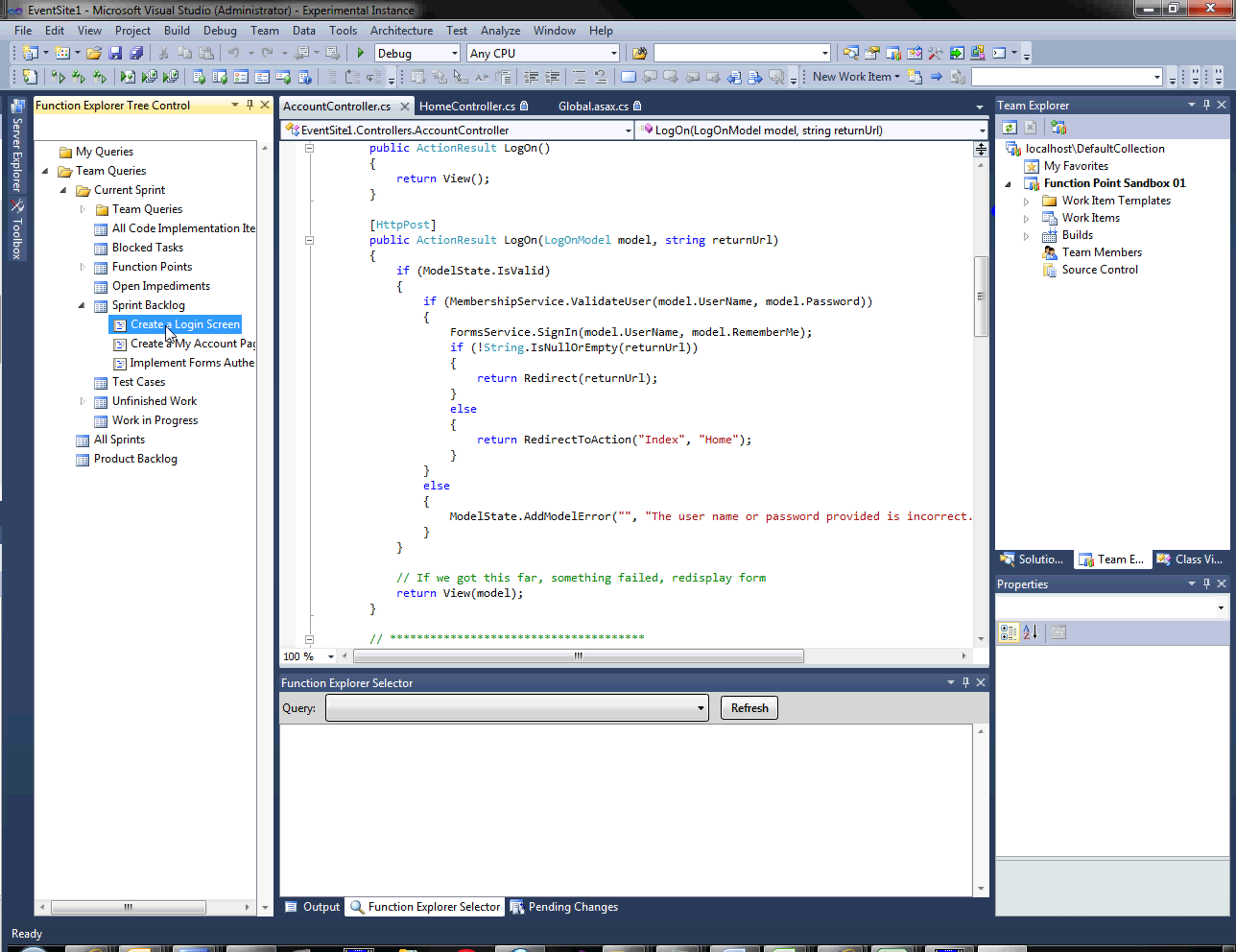 Dragging a work item from the Function Point Explorer
We start by dragging a work item to the code window to a position that we want to make an annotation.
Step 2: Drop Work Item
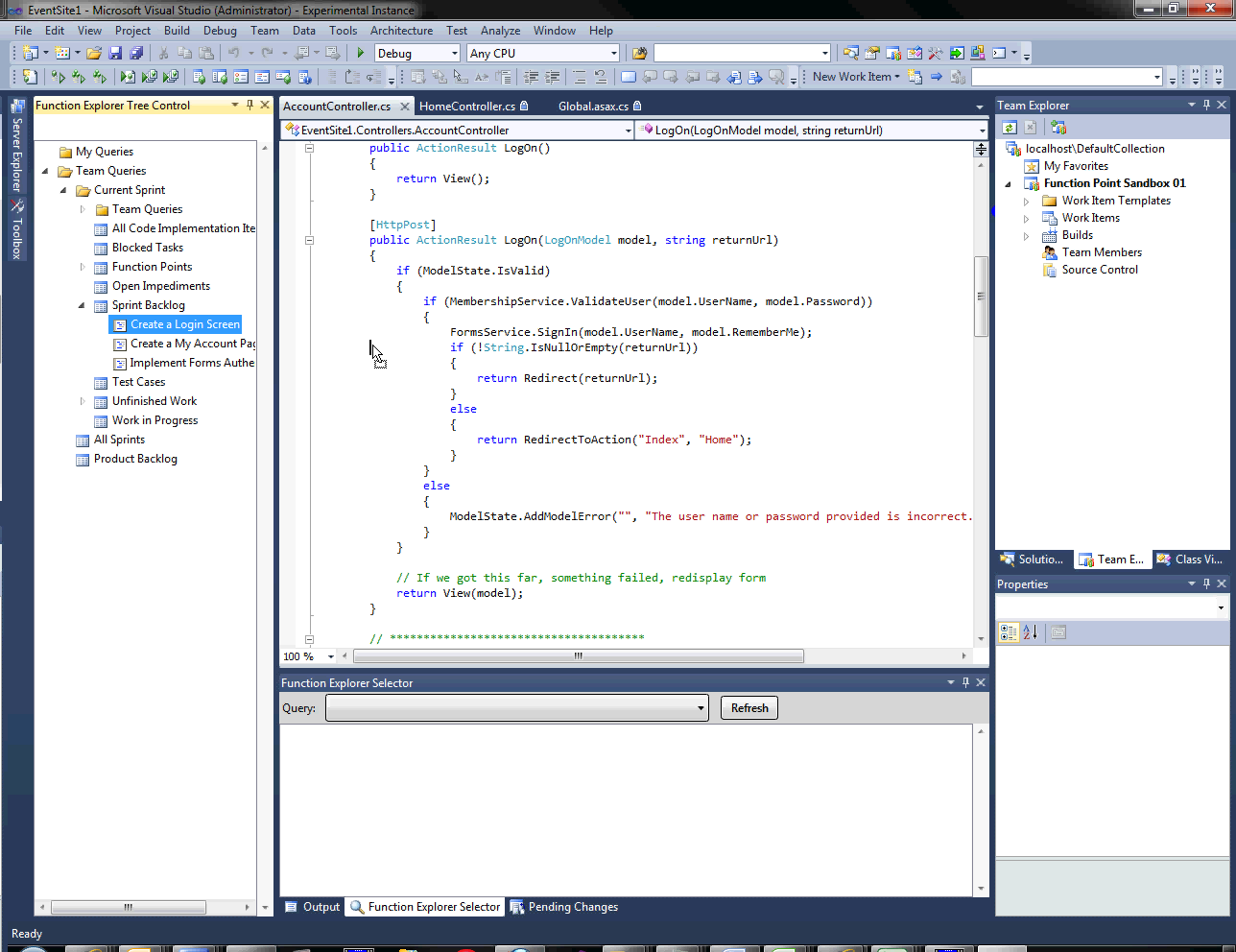 The work item being dropped in the code
When the item is dropped, a DropHandler is invoked which brings up a window to gather the least amount of information in order to successfully create a Design Point Work item. It gives the ability to customize the title, assign a resource, and leave any comments. Under the hood it has done code discovery and linked to the parent Backlog scope item. Clicking OK finishes the process and commits the work item to TFS.
Step 3: Design Point Created
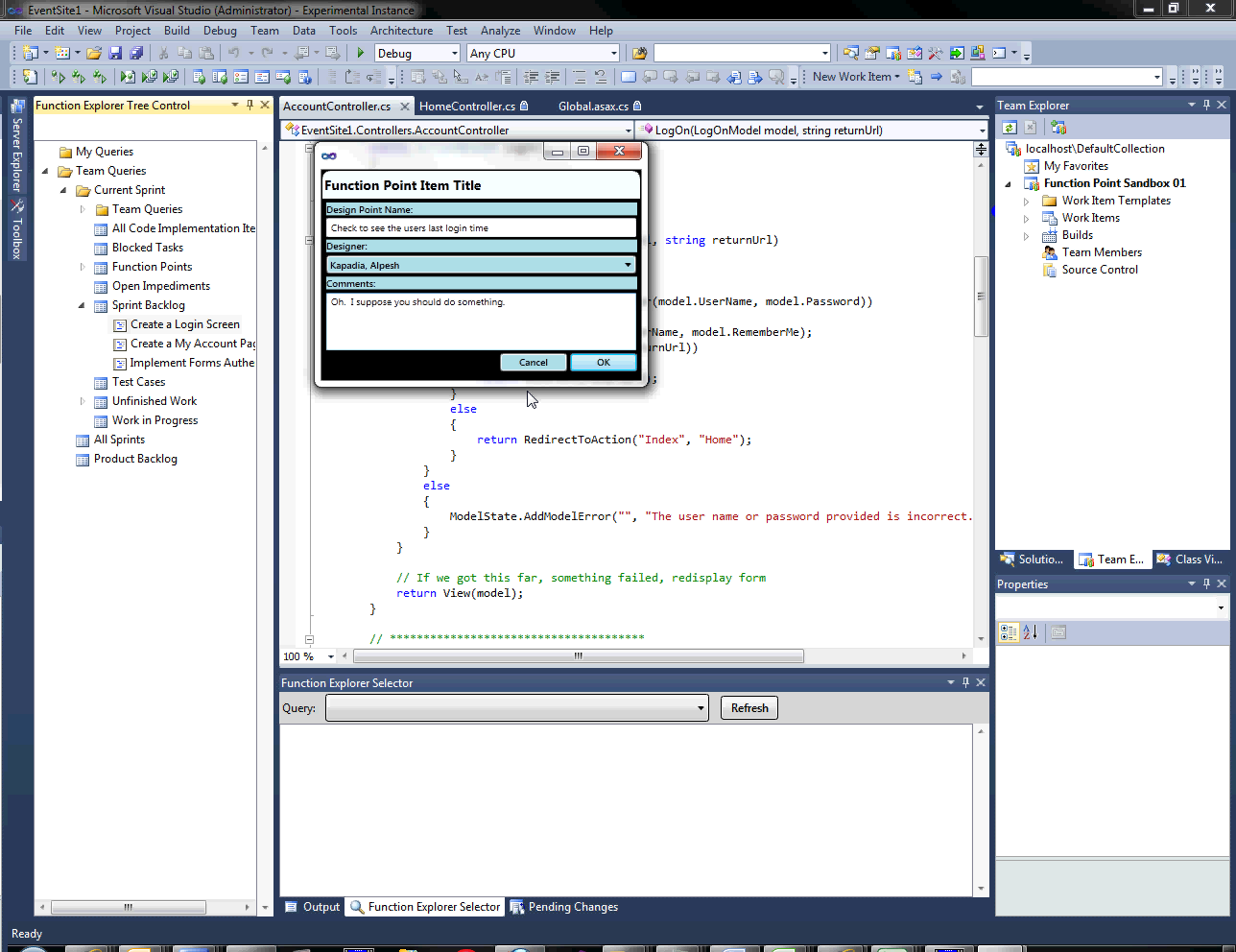 The dialog for creating the design point
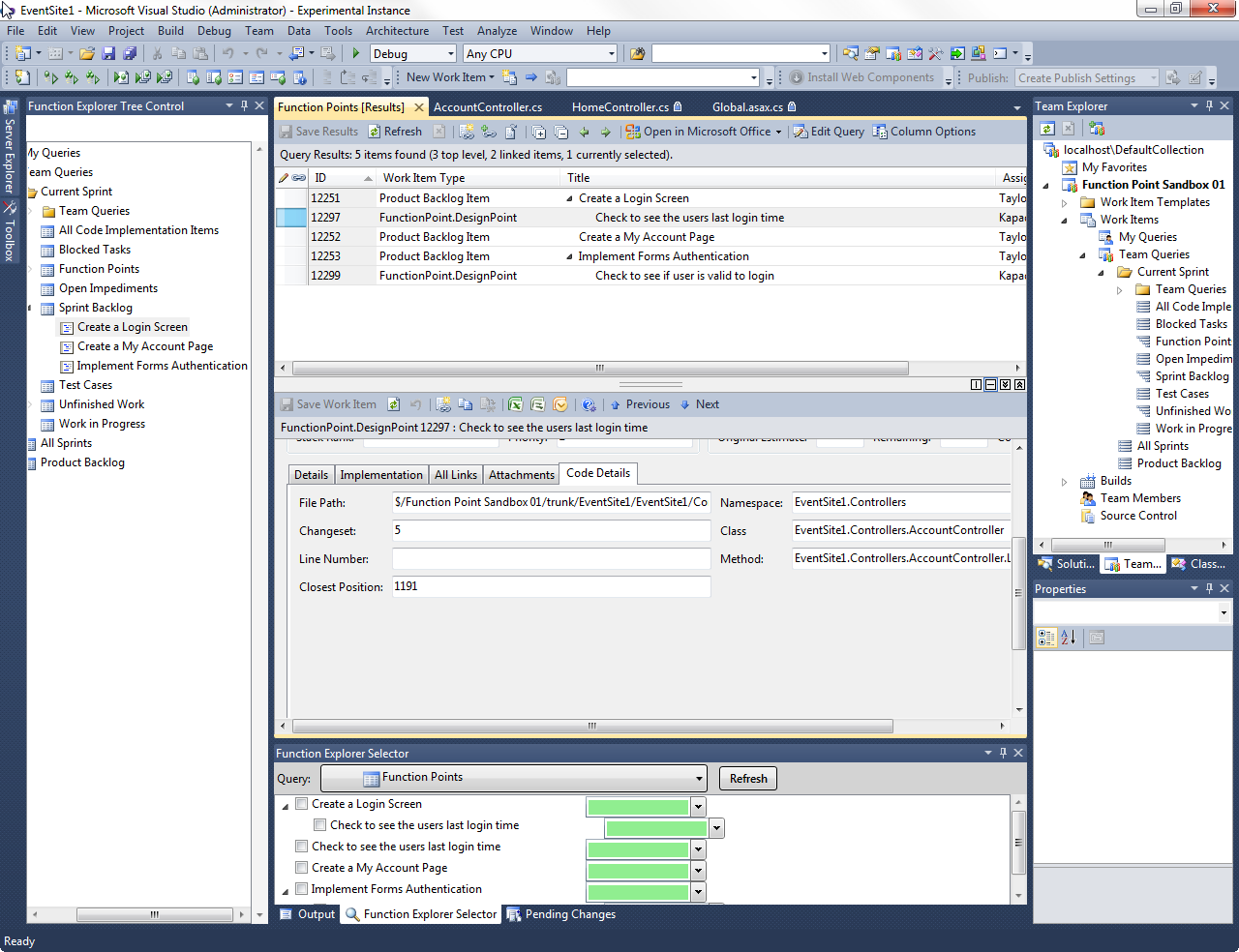 The code details interface
An adornment is now visible on the screen showing where a design point is. This is based on the character position and changeset (because subsequent changesets would likely move the character position. We have plans to deal with this. Just nothing done yet.). The item is now also checked in the Function Point Selector window. By unclicking it, the adornment is no longer visible. Clicking others dispalys them. As you can see, you have the option of changing the background color as well to distinguish different parts.
(Note, also working on a Margin Provider like the Overview margin in Power Tools for a more wholistic view)
Step 4: Associate Code with Design Point
 The code association interface
For simplicity, we are going to pretend the code didn't exist yet and we wrote it. You can see in the next example we highlight what we've written and now drag it over the adornment. This will now associate the code we've written with a design point. Giving us tracability from requirements -> code.
Step 5: Code Implementation
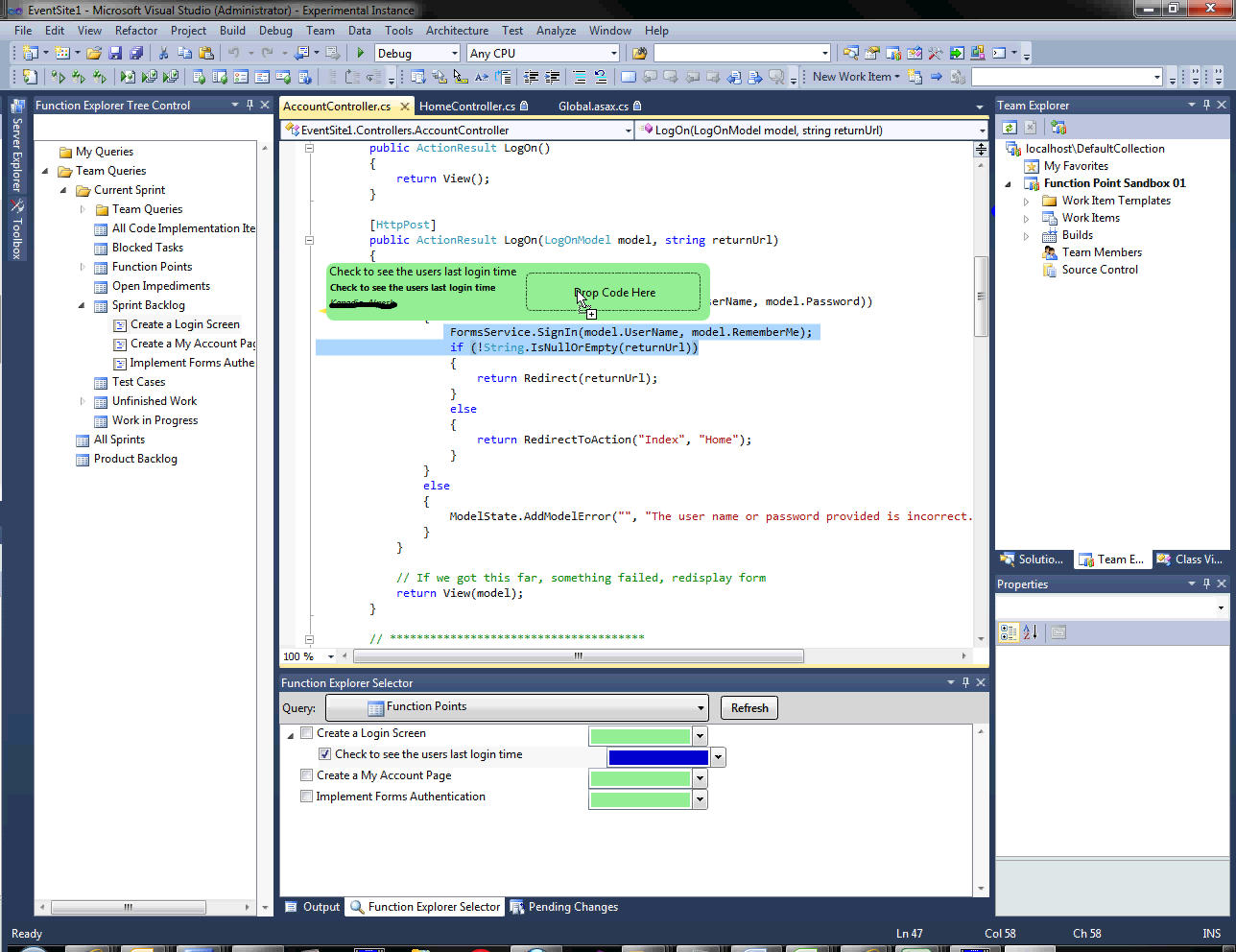 Dropping code onto the design point
When we look at a query for our implemented code, we can see that it's been linked to a specific function point.
Step 6: Traceability Results
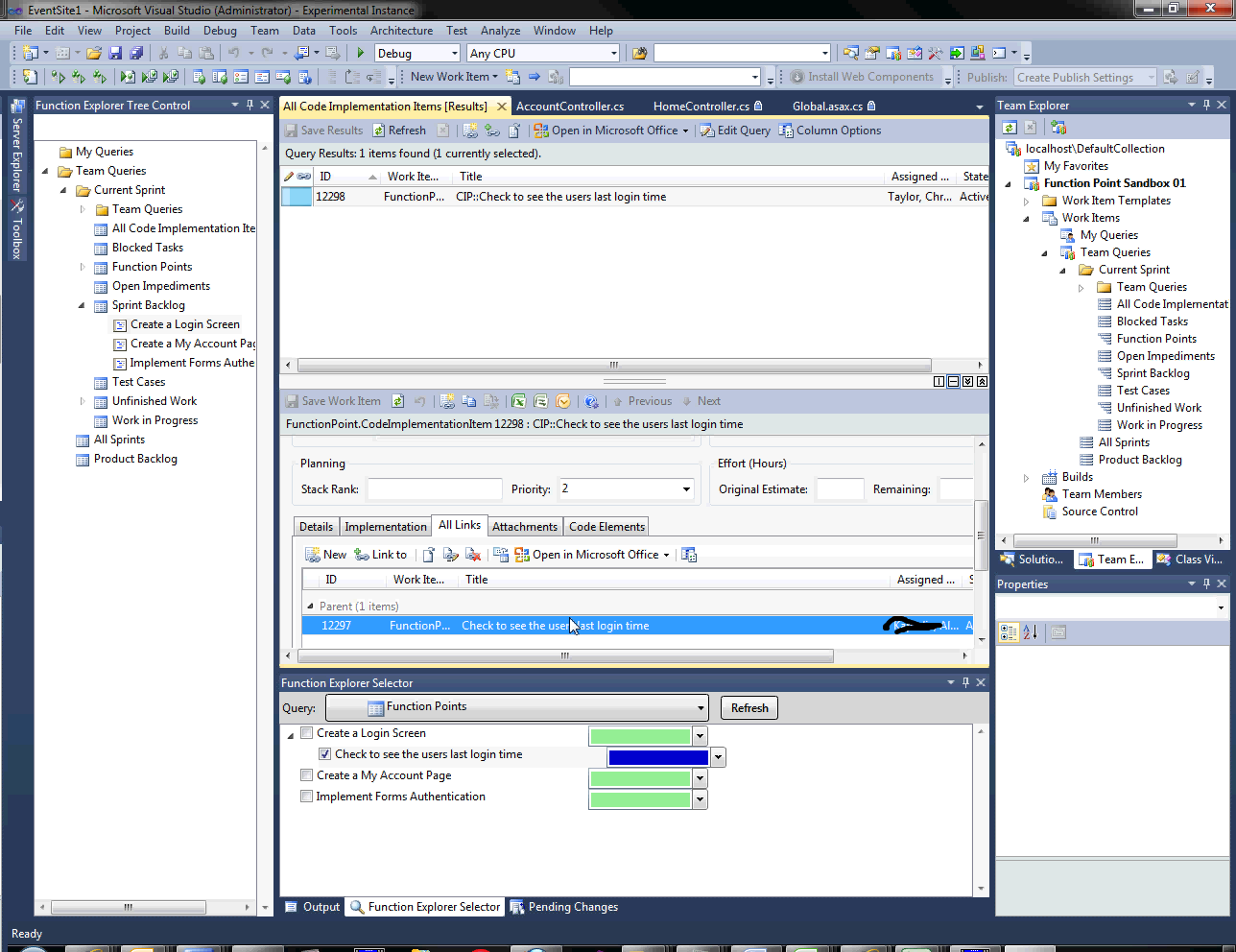 The linked code implementation
We've also captured a snapshot of the code added(RTF -> HTML, working on something more WPF friendly if there is such a thing)
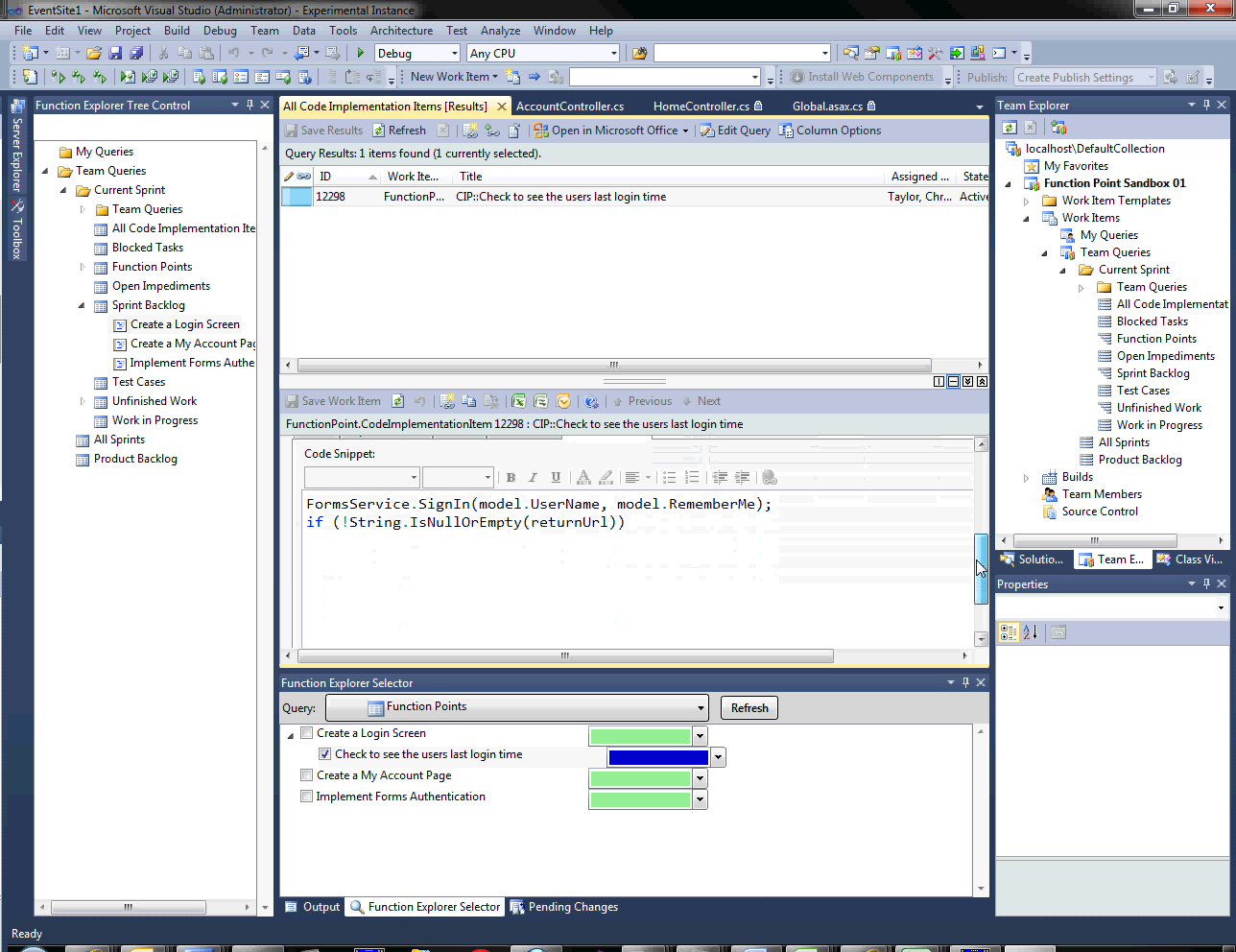 The code snapshot
Everything is now linked and because it is in the Work Item store these details are reportable. We can see changes by change set (and compile that down to build) which would be able to tell us impacted areas for testing with real data instead of guessing.
Future Vision
Future versions look to be able to do that type of analysis automatically. Including reports showing possible conflicts, a service to move function point location based on a merge, and a system of mapping a logical view of the software (such as feature or page functionality like "Account Management" which covers a number of pages and classes).
Development Status
Big note: This is no where near production ready or even good enough to be an alpha. It gets the official "Works on my machine" stamp. Look at code, play, offer ideas, criticism. Whatever works. Lots to come. Seriously.